woensdag 15 juli 2015

Customizing Eclipse name on Mac OSX

Eclipse Force Quit 1

How many times when you have multiple instances of Eclipse open and you want to Force Quit one, you don't know which one it is after pressing CMD-ALT-ESC? You can change the name in the task switcher by renaming the Eclipse application in the Applications folder, but the menu name comes from somewhere else. Below I will explain how to change the menu name.

Step 1: Locate the eclipse.ini file

Eclipse ini location

Find the Eclipse application int he Applications folder and do a right-click or ctrl-click and choose Show Package Contents. Then move into the Contents/Eclipse folder and find eclipse.ini and open it using a text editor such as BBEdit.

Step 2: Adding the desired name

Eclipse ini 1

Oops, there appear to be many duplicate lines here resulting from an automated build process. No worry, I opened Bug 472698 for this. Using the BBEdit Text / Process Duplicate Lines... command I removed all leaving one.

Eclipse ini 2

Now we add a line in the -vmargs section with -Xdock:name=Eclipse 45 RCP and save the file.

Step 3 Verify

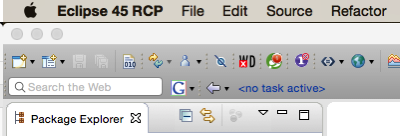
Eclipse Menu Bar

Restarting Eclipse will show the new name in the Menu bar, very handy when ALT-TAB-ing through open applications.

Eclipse Force Quit 2

When using CMD-ALT-ESC the new name now appears in the list.

vrijdag 8 mei 2015

Using JYZ3D (and JOGL) in Eclipse RCP

As part of evaluating several 3D charting packages for use in Eclipse RCP Applications I needed to get JYZ3D (http://www.jyz3d.org) working on OSX.

Jzy3d is an open source java library that allows to easily draw 3d scientific data: surfaces, scatter plots, bar charts, and lot of other 3d primitives. The API provides support for rich interactive charts, with colorbars, tooltips and overlays. Axis and chart layout can be fully customized and enhanced. Relying on JOGL 2, you can easily deploy native OpenGL charts on Windows, Unix, MacOs (...) and integrate into Swing, AWT, or SWT. Various contributions have also made Jzy3d available for other languages/platforms such as Scala, Groovy, and Matlab.

JYZ3D is described as suitable for RCP but it requires some setup. I describe the process below in order to help others get results quicker.

First attempt

Using libraries in RCP requires packaging them in bundles and adding an OSGi MANIFEST so that they can be properly located as dependencies. As JYZ3D requires JOGL (http://jogamp.org/jogl/www/) I looked for ways to install JOGL easily on RCP, by converting it to a bundle. I found the tutorial by Wade Walker from 2010 that can easily be adapted to the latest version of JOGL meaning 2.3.1.

The first attempt resulted in a Exception: java.lang.UnsatisfiedLinkError: Can't load library: /System/Library/Frameworks/gluegen-rt.Framework/gluegen-rt

UnsatisfiedLinkError

As JOGL uses some interesting class loader tricks, the main library requires an Activator to insert some extra logic on start up using JarUtil.setResolver().

The resulting Activator.java is as follows:

package jogamp.osgi;

import java.io.IOException;
import java.net.URL;

import jogamp.nativewindow.Debug;

import org.eclipse.core.runtime.FileLocator;
import org.eclipse.swt.awt.SWT_AWT;
import org.eclipse.ui.plugin.AbstractUIPlugin;
import org.osgi.framework.BundleContext;

import com.jogamp.common.util.JarUtil;

/**
 * The activator class controls the plug-in life cycle
 */
public class Activator extends AbstractUIPlugin {

 // The shared instance
 private static Activator plugin;

 /**
  * Returns the shared instance
  *
  * @return the shared instance
  */
 public static Activator getDefault() {
  return plugin;
 }

 /**
  * The constructor
  */
 public Activator() {
 }
 @Override
 public void start(BundleContext context) throws Exception {
  super.start(context);
  JarUtil.setResolver(new JarUtil.Resolver() {
   @Override
   public URL resolve(URL url) {
    try {
     // System.out.println("before resolution: " + url.toString());
     URL after = FileLocator.resolve(url);
     // System.out.println("after  resolution: " + after.toString());
     return (after);
    } catch (IOException ioexception) {
     return (url);
    }
   }
  });
  plugin = this;
}

 @Override
 public void stop(BundleContext context) throws Exception {
  plugin = null;
  super.stop(context);
 }

}

There was a change in the native code library naming conventions from Java 6 to Java 7 so you must unpack the *macosx-universal jars (jogl and gluegen), duplicate al *.jnilib files to *.dylib files and repack into the jars.

Once you have done this you can run Wade Walker's example view code.

JOGL Demo Wade Walker I then downloaded jars for JZY3D 0.9.1 from Maven and created a bundle using Create Bundle from jar.

The result was a lot of errors about package javax.media.opengl not being found. JXY3D relies on a much older version of JOGL and despite it being a 2.x.x. version there is definitely a compatibility break here. So much for the adoption of proper semantic versioning.

Second attempt

I downloaded the source for JXY3D from GitHub from https://github.com/jzy3d/jzy3d-api importing them as Maven projects (important step) and built the jars as Maven projects.

These depend on a newer version of JOGL (2.1.5-01) but having learned my lesson about version compatibility I created new JOGL Library plugin using the jars for version 2.1.5-01. I downloaded these from Maven Central. Again fix the native library naming issue for macosx-universal versions.

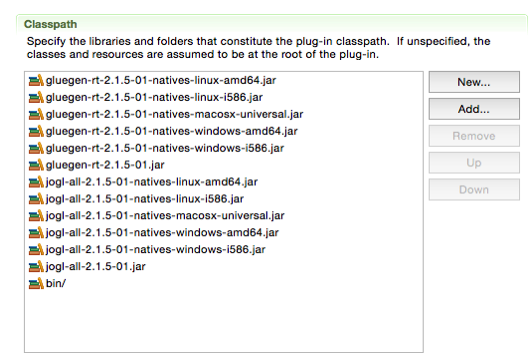
The mechanism for finding the natives changes between JOGL versions, so here the solution is to put all native jars into the same bundle as the main library. Again add the above bundle activator, and, as this is a bundle with native jars in the root, add the bin/ folder with the Activator to the class path.

Another problem (noted by Alexis Drogoul) is a bug in FileLocator that occurs when the path contains spaces. This was also fixed on 2015-06-03

classpath

The final error purely on OSX was org.eclipse.swt.SWTError: Not implemented java.lang.ClassNotFoundException: apple.awt.CEmbeddedFrame> This can be solved using the magic found on stackoverflow: SWT_AWT.embeddedFrameClass = "sun.lwawt.macosx.CViewEmbeddedFrame";

The final Activator.java is as follows:

package jogamp.osgi;

import java.io.IOException;
import java.net.URL;

import jogamp.nativewindow.Debug;

import org.eclipse.core.runtime.FileLocator;
import org.eclipse.swt.awt.SWT_AWT;
import org.eclipse.ui.plugin.AbstractUIPlugin;
import org.osgi.framework.BundleContext;

import com.jogamp.common.util.JarUtil;

/**
 * The activator class controls the plug-in life cycle
 */
public class Activator extends AbstractUIPlugin {

 // The shared instance
 private static Activator plugin;

 /**
  * Returns the shared instance
  *
  * @return the shared instance
  */
 public static Activator getDefault() {
  return plugin;
 }

 /**
  * The constructor
  */
 public Activator() {
 }
 @Override
 public void start(BundleContext context) throws Exception {
  super.start(context);
  if ("Mac OS X".equals(System.getProperty("os.name"))) {
   System.out.println("Set SWT_AWT.embeddedFrameClass");
   SWT_AWT.embeddedFrameClass = "sun.lwawt.macosx.CViewEmbeddedFrame";
  }
  JarUtil.setResolver(new JarUtil.Resolver() {
   @Override
   public URL resolve(URL url) {
    try {
      // System.out.println("before resolution: " + url.toString());
      URL urlUnresolved = FileLocator.resolve(url);
      URL urlResolved = new URI(urlUnresolved.getProtocol(), urlUnresolved.getPath(), null)
       .toURL();
      // System.out.println("after resolution: " + urlResolved.toString());
      return (urlResolved);
     } catch (IOException ioexception) {
      return (url);
     } catch (URISyntaxException e) {
      return (url);
     }
   }
  });
  plugin = this;
}

 @Override
 public void stop(BundleContext context) throws Exception {
  plugin = null;
  super.stop(context);
 }

}

And then I can also run the example code for JYZ3D.

JYZ3D demo

Lessons

  • Don't assume that everybody uses semantic versioning.
  • Be grateful for the people who take the time to answer questions on StackOverflow.

dinsdag 10 juni 2014

Workspace Mechanic and Eclipse Arduino Plugin

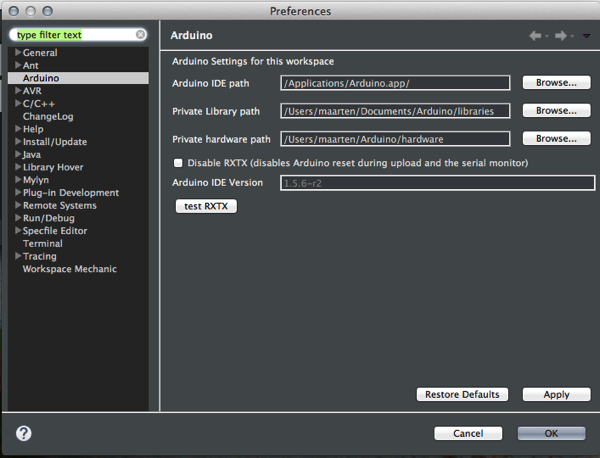
After reading Wim Jongmans blog post about Managing Eclipse Preferences with Workspace Mechanic I decided to give it a go for the Arduino Eclipse Plug-in by Jantje. The settings for this plug-in are managed as instance settings, so they exist once for the Eclipse install. Now that we have regular upgrades to prepare for the Eclipse Luna release, this means reconfiguring for each new download. I use a Mac so it has to look like this:Screen Shot 2014 06 10 at 21 14 48 To make this happen with Workspace Mechanic install this file in your user_home/.eclipse/mechanic/ folder.
# @title Arduino Mac
# @description Standard Arduino Settings
# @task_type RECONCILE
#
# Copyright 2014 Maarten Meijer
# License EPL: http://www.eclipse.org/legal/epl-v10.html
#
file_export_version=3.0
/instance/it.bayens.arduino/Arduino Path=/Applications/Arduino.app/
/instance/it.bayens.arduino/Private Library Path=/Users/your_name/Documents/Arduino/libraries
/instance/it.bayens.arduino/Private hardware Path=/Users/your_name/Arduino/hardware
/instance/it.bayens.arduino/Arduino DisAbleRXTX=false
Every new release you will; get a nice Workspace Mechanic warning and you can fix all!

dinsdag 21 januari 2014

Tycho/JUnit/Jacoco for the Industrial SQL Connector for Mylyn

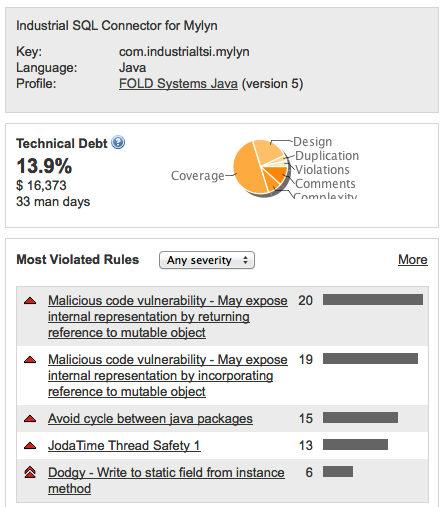
Technicaldebt In the previous installments I created a repeatable Maven build from Hudson, and I set up static code analysis using SonarQube. It was revealed that there is considerable technical debt, and half of that is caused by 0% Coverage. Getting Test Coverage in place has to be done before tackling any of the other issues like duplication, complexity and violations.

Project Setup
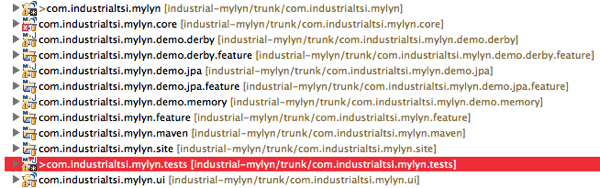
Industrial projects The Project setup for the Industrial SQL Connector for Mylyn is slightly different from other examples found on the internet. The main abstract functionality is handled in the main two plugins:
  • com.industrialtsi.mylyn.core for headless stuff and connection handling, and
  • com.industrialtsi.mylyn.ui for the UI part.
Functionality for a specific kind of database is then "injected" using a fragment project. Three example projects are included:
  • com.industrialtsi.mylyn.demo.memory is a very simple in memory task list for demonstration and testing purposes.
  • com.industrialtsi.mylyn.demo.jpa accesses a simple Derby database but using EclipseLink JPA annotations
  • com.industrialtsi.mylyn.demo.derby contains a link to a Derby database using the apache ibatis xml based SQL access language, that will allow quite complicated JOIN and UNION statements in its queries.
  • org.apache.ibatis finally contains the ibatis stuff packaged in a separate plugin.
All the test code for all these projects finally is placed in a single plugin:
  • com.industrialtsi.mylyn.tests contains al test code.

Getting the test code to compile under Tycho
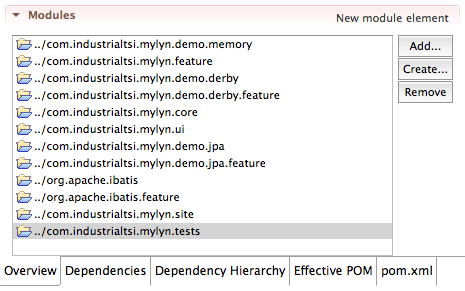
Industrial test in pom The first step is to add the test project to the main POM in industrialtsi.mylyn.maven. When we run a simple maven build compilation fails:
[ERROR] Failed to execute goal org.eclipse.tycho:tycho-compiler-plugin:0.19.0:compile (default-compile) on project com.industrialtsi.mylyn.tests: Compilation failure: Compilation failure:
[ERROR] /Users/maarten/Workspaces/workspace-industrial-google/com.industrialtsi.mylyn.tests/src/com/industrialtsi/mylyn/demo/derby/test/DerbyIbatisPersistorTest.java:[18]
[ERROR] import com.industrialtsi.mylyn.core.persistence.DerbyIbatisPersistor;
[ERROR] ^^^^^^^^^^^^^^^^^^^^^^^^^^^^^^^^^^^^^^^^^^^^^^^^^^^^^^^^^^^^^
[ERROR] The import com.industrialtsi.mylyn.core.persistence.DerbyIbatisPersistor cannot be resolved
[ERROR] /Users/maarten/Workspaces/workspace-industrial-google/com.industrialtsi.mylyn.tests/src/com/industrialtsi/mylyn/demo/derby/test/DerbyIbatisPersistorTest.java:[43]
[ERROR] return new DerbyIbatisPersistor();
[ERROR] ^^^^^^^^^^^^^^^^^^^^
[ERROR] DerbyIbatisPersistor cannot be resolved to a type
[ERROR] 2 problems (2 errors)
When compiling in the workspace, eclipse is very helpful in finding all the needed dependencies. As the missing import is located in a fragment of another plugin, normal dependency tricks via the MANIFEST.MF of com.industrialtsi.mylyn.tests or as dependency in the POM file don't work. Add to build properties The quick solution was to include the missing jar as Extra Classpath Entry in the build.properties of com.industrialtsi.mylyn.tests. If anybody knows a better way, please let me know!
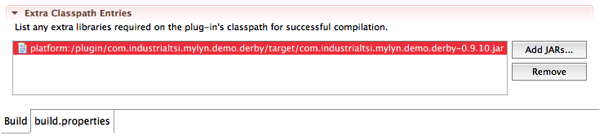
Adding tycho-surefire to pom.xml

Next we need to configure the tycho surefire plugin to run the tests and process the results. I'm can rely on the tycho-surefire plugin to load my tests plugin and its direct dependencies. But I want to run a full workbench which I define with the <application> and <product> tags. I also want the com.industrialtsi.mylyn.demo.memory and com.industrialtsi.mylyn.demo.derby fragments to be loaded, which I do with the <dependencies> section. Then I disable the more complicated test till later.
<plugin>
    <groupId>org.eclipse.tycho</groupId>
    <artifactId>tycho-surefire-plugin</artifactId>
    <version>${tycho-version}</version>
    <configuration>
        <argLine>${ui.test.vmargs}</argLine>
        <useUIHarness>true</useUIHarness>
        <useUIThread>true</useUIThread>
        <product>org.eclipse.platform.ide</product>
        <application>org.eclipse.ui.ide.workbench</application>
        <dependencies>
            <dependency>
                <type>eclipse-plugin</type>
                <artifactId>com.industrialtsi.mylyn.demo.memory</artifactId>
                <version>0.9.10</version>
            </dependency>
            <dependency>
                <type>eclipse-plugin</type>
                <artifactId>com.industrialtsi.mylyn.demo.derby</artifactId>
                <version>0.9.10</version>
            </dependency>
        </dependencies>
        <includes>
            <include>**/*Test.java</include>
        </includes>
        <excludes>
            <exclude>**/IbatisPersistorTest.*</exclude>
            <exclude>**/PersistorsManagerTest.*</exclude>
            <exclude>**/DemoDerbyTest.*</exclude>
            <exclude>**/DerbyIbatisPersistorTest.*</exclude>
            <exclude>**/IbatisCorePluginTest.*</exclude>
            <exclude>**/TaskCreationTest.*</exclude>
        </excludes>
        <!-- Kill test JVM if tests take more than 10 minutes (600 seconds)
            to finish -->
        <forkedProcessTimeoutInSeconds>600</forkedProcessTimeoutInSeconds>
    </configuration>
</plugin>

Controlling memory and start Thread on Mac

Running on a Mac requires different startup parameters passed with the <argLine> tag. This is handeld best in the profiles section of the POM:
<profiles>
    <profile>
        <id>macosx</id>
        <activation>
            <os>
                <family>mac</family>
            </os>
        </activation>
        <properties>
            <ui.test.vmargs>-Xmx512m -XX:MaxPermSize=256m -XstartOnFirstThread</ui.test.vmargs>
        </properties>
    </profile>
    <profile>
        <id>other-os</id>
        <activation>
            <os>
                <family>!mac</family>
            </os>
        </activation>
        <properties>
            <ui.test.vmargs>-Xmx512m -XX:MaxPermSize=256m</ui.test.vmargs>
        </properties>
    </profile>
</profiles>

ready to run the tests in the workspace

Industrial maven Then we need to run a Tycho build using the m2e tools. It is important to realize that Plug-in Unit Tests are run in the integration test phase, so we need to specify that as a target.
-------------------------------------------------------
 T E S T S
-------------------------------------------------------
Running com.industrialtsi.mylyn.core.dto.IndustrialQueryParamsTest
Tests run: 16, Failures: 0, Errors: 0, Skipped: 0, Time elapsed: 0.039 sec
Running com.industrialtsi.mylyn.test.db.core.GenericQueryParamsTest
Tests run: 7, Failures: 0, Errors: 0, Skipped: 0, Time elapsed: 0.01 sec

Results :

Tests run: 23, Failures: 0, Errors: 0, Skipped: 0

[INFO] All tests passed!
[INFO] ------------------------------------------------------------------------
[INFO] Reactor Summary:
[INFO] 
[INFO] com.industrialtsi.mylyn.maven ..................... SUCCESS [0.073s]
[INFO] org.apache.ibatis ................................. SUCCESS [1.477s]
[INFO] com.industrialtsi.mylyn.core ...................... SUCCESS [1.605s]
[INFO] com.industrialtsi.mylyn.demo.memory ............... SUCCESS [0.386s]
[INFO] com.industrialtsi.mylyn.ui ........................ SUCCESS [0.997s]
[INFO] com.industrialtsi.mylyn.feature ................... SUCCESS [2.616s]
[INFO] com.industrialtsi.mylyn.demo.derby ................ SUCCESS [0.685s]
[INFO] org.apache.ibatis.feature ......................... SUCCESS [2.321s]
[INFO] com.industrialtsi.mylyn.demo.derby.feature ........ SUCCESS [2.329s]
[INFO] com.industrialtsi.mylyn.demo.jpa .................. SUCCESS [1.254s]
[INFO] com.industrialtsi.mylyn.demo.jpa.feature .......... SUCCESS [2.399s]
[INFO] com.industrialtsi.mylyn.site ...................... SUCCESS [3.129s]
[INFO] com.industrialtsi.mylyn.tests ..................... SUCCESS [7.804s]
[INFO] ------------------------------------------------------------------------
[INFO] BUILD SUCCESS
[INFO] ------------------------------------------------------------------------
[INFO] Total time: 57.488s
[INFO] Finished at: Tue Jan 21 11:33:31 CET 2014
[INFO] Final Memory: 59M/554M
[INFO] ------------------------------------------------------------------------

Adding Jacoco coverage to the pom.xml

Lets start with adding the Jacoco plugin to the POM file.
<plugin>
    <groupId>org.jacoco</groupId>
    <artifactId>jacoco-maven-plugin</artifactId>
    <version>0.6.4.201312101107</version>
    <executions>
        <execution>
            <id>prepare-integration-tests</id>
            <phase>pre-integration-test</phase>
            <goals>
                <goal>prepare-agent</goal>
            </goals>
            <configuration>
                <include>com.industrialtsi.*</include>
                <include>org.junit.*</include>
                <!-- Where to put jacoco coverage report -->
                <destFile>${sonar.jacoco.reportPath}</destFile>
                <append>true</append>
            </configuration>
        </execution>
    </executions>
</plugin>
Configuring a multi-module plugin project for coverage with Jacoco has some special hurdles which easily lead to frustration. All coverage code must be placed in a single *.exec file to analyzed later, this is handled by the <destFile>${sonar.jacoco.reportPath}</destFile> line. This property is defined in the properties section:
<sonar.jacoco.reportPath>${project.build.directory}/../../com.industrialtsi.mylyn.tests/target/jacoco.exec</sonar.jacoco.reportPath>
Tycho has a special argline variable to pass to the tycho-surefire plugin named tycho.testArgLine that we must pass on in the tycho-surefire plugin:
    <artifactId>tycho-surefire-plugin</artifactId>
    <version>${tycho-version}</version>
    <configuration>
        <argLine>${ui.test.vmargs} ${tycho.testArgLine}</argLine>
Jacoco exec generated Now we can run again and get to see that jacoco.exec is actually generated in the workspace. We can now run the unit tests from the test plugin and measure code coverage with jacoco from a maven build.

not to be forgotten: SonarQube setup

We are running SonarQube from Hudson using the Run Standalone Sonar Analysis build step. We want that analysis to reuse the jacoco.exec file generated during the maven integration-test step. The standalone step uses sonar-project.properties for configuration. So we add:
sonar.dynamicAnalysis=reuseReports
sonar.jacoco.reportPath=../com.industrialtsi.mylyn.tests/target/jacoco.exec
If we had run SonarQube from maven using the sonar:sonar or verify targets, we should configure sonar in the pom.xml.
<properties>
    ...
    <sonar.java.coveragePlugin>jacoco</sonar.java.coveragePlugin>
    <sonar.dynamicAnalysis>reuseReports</sonar.dynamicAnalysis>
    ...
</properties>
I do both know that I'm working on it so I have flexibility later.

Now commit to SCM and start a Hudson build

Start a Hudson build manually or wait for SCM polling to kick in, but the result looks promising: Hudson build w coverage 3.63% Coverage is not much, but easy to expand now that this works.

Finally: results in SonarQube

Technical debt improved I managed to reduce Technical Debt with $ 390 and one man day compared to the start of this blog post. Seems like a low yield for a half day work, but I guess the calculations do not allow for the ramp up cost: running the first coverage is hardest. Progress should be easier now that the build and static analysis infrastructure is in place. Code coverage up Unit Test Coverage is up from 0% with only the two simplest tests executing. Next steps are activating the tests disabled earlier and adding more test. To be continued...

maandag 20 januari 2014

Analyzing the Industrial SQL Connector for Mylyn with SonarQube

Last year we set up Hudson to build the Industrial SQL Connector for Mylyn, a DIY connector project to connect Mylyn to a local SQL database for which I'm a committer. This blog post I will explain how I set up static code analysis on the same project using SonarQube. Installing and setting up SonarQube is better explained elsewhere, like http://www.sonarqube.org, but then setting up a set op eclipse plugin projects to be analyzed is more specific.

Preparation:

  • Install SonarQube following instructions here.
  • Then install the Sonar plugin into Hudson using Update Center and configure it following these instructions
  • Lookup how to build the Industrial SQL Connector for Mylyn with Hudson here

Configuring the Industrial SQL Connector for Mylyn for analysis

Whether you want to analyze projects with the Maven sonar:sonar target or use the Hudson Invoke Standalone Sonar Analysis build step in both cases you need to create a sonar-project.properties file. As a matter of common sense I always put this file in the same project as the project with the maven master POM, in this case com.industrialtsi.mylyn.maven.
# required metadata
sonar.projectKey=com.industrialtsi.mylyn
sonar.projectName=Industrial SQL Connector for Mylyn
sonar.projectVersion=0.9.10-SNAPSHOT

# optional description
sonar.projectDescription=Industrial SQL Connector for Mylyn

# path to source directories (required)
#sonar.sources=src THIS IS SPECIFIED PER MODULE

# path to project binaries (optional), for example directory of Java bytecode
#sonar.binaries=target/classes THIS IS SPECIFIED PER MODULE

# optional comma-separated list of paths to libraries. Only path to JAR file is supported.
#sonar.libraries=lib/*.jar THIS IS SPECIFIED PER MODULE

# The value of the property must be the key of the language.
sonar.language=java

# modules one for each area of functionality, only plugin and fragment projects
sonar.modules=core,derby,jpa,memory,ui

# setup project base dir
core.sonar.projectBaseDir=com.industrialtsi.mylyn.core
derby.sonar.projectBaseDir=com.industrialtsi.mylyn.demo.derby
jpa.sonar.projectBaseDir=com.industrialtsi.mylyn.demo.jpa
memory.sonar.projectBaseDir=com.industrialtsi.mylyn.demo.memory
ui.sonar.projectBaseDir=com.industrialtsi.mylyn.ui

#set up source folders 
core.sonar.sources=src
derby.sonar.sources=src
jpa.sonar.sources=src
memory.sonar.sources=src
ui.sonar.sources=src

# set up binary folders
core.sonar.binaries=target/classes
derby.sonar.binaries=target/classes
jpa.sonar.binaries=target/classes
memory.sonar.binaries=target/classes
ui.sonar.binaries=target/classes

# set up libraries folders, where jars reside
core.sonar.libraries=
derby.sonar.libraries=lib/*.jar
jpa.sonar.libraries=lib/*.jar
memory.sonar.libraries=
ui.sonar.libraries=
Then we commit this file to the repository so Hudson can retrieve it.

Configuring Hudson to analyze the project

We go to the Hudson Job tab and press configure. Under Build we add a step Invoke Standalone Sonar Analysis and configure it as follows: Sonar hudson config

Building and examining the results

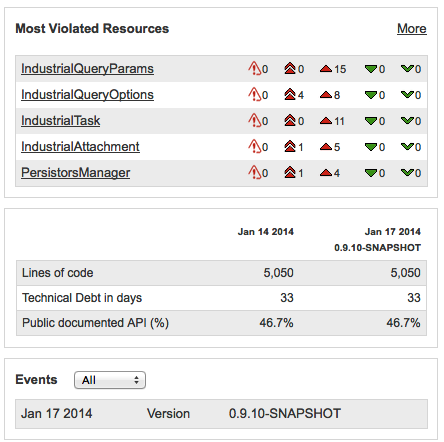
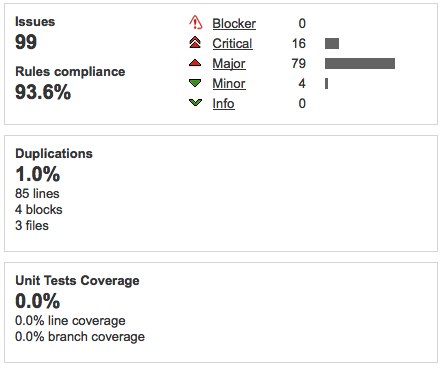
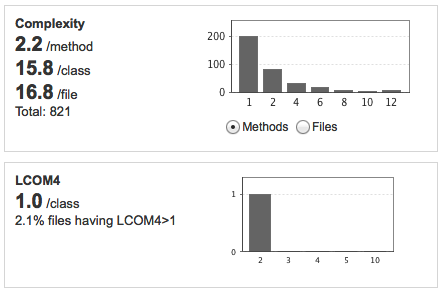
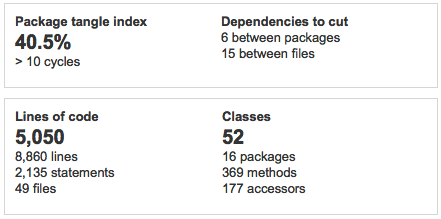
We make Hudson build the project and then go over to the SonarQube pages for the results, note that I have created a custom set of my favorite widgets for this: Sonarqube 1 The Technical Debt widget tell us the technical debt in days, and also a percentage split of the main problems. Lack of coverage explains half the debt, with design, comments and complexity as other issues. There are very few violations and duplications, the happy result of running with Checkstyle, Findbugs and PMD inside Eclipse during the development. I always add a Most Violated Rules widget to the project dashboard. Exposing internal representation is the most common here as the very bad package cycles. Sonarqube 2 The "Most Violated Resources" widget instantly tells me that the objects used to ferry query parameters around are the main problem area. I have a tagged sonar-project.properties file so I will be able to see progress in the future on lines of code, technical debt and documented API. Sonarqube 3 Issues are mostly Critical and Major, so need to be fixed urgently. 1% duplications is not that serious, even though 0% is best of course. Test coverage is more serious as we've seen above that lack of Test Coverage accounts for half of technical debt. This maybe because the build is not yet configured to execute tests. Sonarqube 4 The complexity stats show mainly whether design is good, a method should do one thing, a class should have one responsibility. The LCOM4 measure of 1.0/class is quite positive. Sonarqube 5 The main problem in these is the startling 40.5% of package tangle index and more than 10 cycles! This needs to be looked at with highest priority.
Action Plan

So this short exercise (total time to setup 1,5 hours) revealed quite a lot of potential problems in the code base! How then to tackle and resolve these problems?
  1. Ensure that the unit tests are executed and measured! Without unit tests we cannot begin to refactor safely.
  2. Fix the Critical Issues in the code, but only when adequately covered by unit tests
  3. Investigate and fix the Package Cycles problems, but again only when adequately covered by unit tests
  4. Fix the Major Issues in the code, but only when adequately covered by unit tests
  5. Fix the Code Duplications problems
I will report on my findings here. For unit test coverage I'm going to use Jacoco, which works well inside Eclipse using the Eclemma plugin, is preferred by SonarQube and can also be integrated with Tycho/Maven.

donderdag 22 augustus 2013

Building the Industrial SQL Connector for Mylyn with Hudson

To get early warning when changes in Eclipse, Mylyn or EclipseLink break the build of Industrial SQL Connector for Mylyn, I have set up a build on my home Hudson CI server. When you want to use this connector you can do the same following the steps below.

Prerequisites

You will need a Hudson CI server set up, follow instructions here. You will also need maven installed from here or use the integrated version.

Create a new Hudson Job

01 createjob

After pressing OK you will see:

02 jobcreated

Configure and test SVN checkout

Enter the anonymous SVN checkout url from EclipseLabs : http://svn.codespot.com/a/eclipselabs.org/industrial-mylyn/trunk/. Also configure the build triggers, now set for 30 minutes past hour on weekdays. Can probably be less, but CI is supposed to be well continuous

03 configuresvn

After saving this configuration, press Build Now

04 testbuild

05 allcheckedout

When it's done, check the Workspace. It should look like this:

06 workspaceview

Configure the Maven/Tycho build and test it.

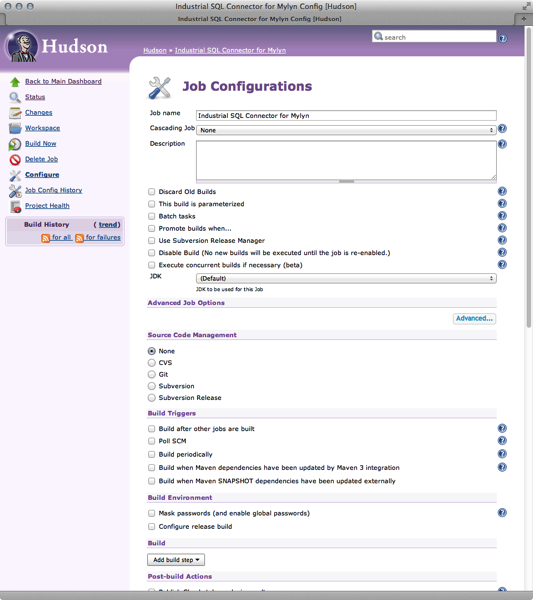
Next step is to add building the checked out code. Industrial SQL Connector for Mylyn comes preconfigured for a Maven/Tycho build so that is easy. Add the Build Step named Invoke Maven 3

07 addmaven3build

We need some advanced options so click the Advanced button. Most important is that the root pom file is not in the root directory but in com.industrialtsi.mylyn.maven/

08 configuremaven3build

Press Build Now again.

09 testbuildagain

Build success

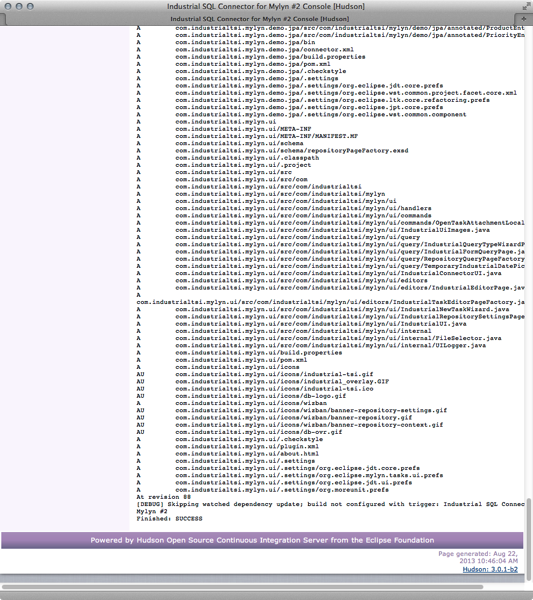
When all is well you should see this, Finished: SUCCESS

10 testbuildsuccess

Results are all in the Workspace, so a bit hard to find:

11 testbuildresults

Publishing artifacts

You can archive and publish the artifacts produced by Maven by configuring the build.

12 archiveresults

This produces the following Job display:

13 resultspublished

Sunshine!

14 sunshine

dinsdag 20 augustus 2013

Industrial SQL Connector for Mylyn updated for Eclipse 4.3 and Mylyn 3.9.0 (now version 0.9.10)

New activity at Bug 184532: [connector] Generic SQL connector meant it was time for a fresh look at the Industrial SQL connector for Mylyn.

New Kepler Platform Target

I have added a Kepler target platform with latest Mylyn and EclipseLink 2.4.2 for easy configuration Kepler Target I have updated the references In the MANIFEST.MF to point to Mylyn 3.9.0

Connector build with Maven/Tycho

I fixed the Tycho/Maven build so you can quickly get up to speed Tycho/Maven build

Fragment build with Maven/Tycho

In the process I made an interesting discovery about Tycho dependency resolution when compiling fragments. An Eclipse code fragment depends on a host plug-in. The PDE allows the fragment to use all dependencies of the host, even the ones marked optional. When building with Maven/Tycho these dependencies are not resolved. The fix was to add the required JAR to the Extra Classpath Entries of build.properties of the fragment. Extra Classpath Entries

Resources

Code for the Industrial SQL connector for Mylyn is hosted at EclipseLabs.

donderdag 24 januari 2013

Starting Hudson automatically on Mac OSX.

With yesterdays release of Hudson 3.0.0 by the Eclipse Foundation a step forward was taken again in creating an open source toolchain under proper governance. Hudson is an extensible continuous integration platform allowing you to build, inspect and test code whenever you commit changes to your repository. The new release brings a reduction in footprint of 50% so you can also set it up to run on your local machine. After downloading and installing Hudson following the instructions on www.eclipse.org/hudson you that it is easy to start from the terminal using
> java -jar hudson.war

First try: launchd script

But this quickly becomes tiresome, so there must be a better way. On Mac OSX this is launchd, the launch service. Another important thing is that I don't want all the builds to clutter up my home directory so I want to have the HUDSON_HOME direct to somewhere else. Create a directory /usr/local/hudson and move hudson.war into it.
> sudo mkdir /usr/local/hudson
> mv hudson-3.0.0.war /usr/local/hudson/
> cd /usr/local/hudson/
> sudo chgrp admin hudson-3.0.0.war
> ln -s hudson-3.0.0.war hudson.war
I then created a file in /Library/LaunchDaemons named org.hudson-ci.agent.plist with the following contents (skip this step if you're in a hurry):
<?xml version="1.0" encoding="UTF-8"?>
<!DOCTYPE plist PUBLIC "-//Apple//DTD PLIST 1.0//EN" "http://www.apple.com/DTDs/PropertyList-1.0.dtd">
<plist version="1.0">
<dict>
<!-- Move HUDSON_HOME to /Volumes/yourdisk/hudson_home/ -->
	<key>EnvironmentVariables</key>
	<dict>
		<key>HUDSON_HOME</key>
		<string>/Volumes/yourdisk/hudson_home/</string>
	</dict>
	<key>Label</key>
	<string>org.hudson-ci.agent</string>
    <key>RunAtLoad</key>
    <true/>
    <key>KeepAlive</key>
	<key>ProgramArguments</key>
	<array>
	  <string>java</string>
	  <string>-jar</string>
	  <string>/usr/local/hudson/hudson.war</string>
<!-- prevent Hudson from becoming visible in the Finder & Dock -->
	  <string>-Djava.awt.headless=true</string>
	</array>
	<key>StandardErrorPath</key>
	<string>/Library/Logs/hudson-err.log</string>
	<key>StandardOutPath</key>
	<string>/Library/Logs/hudson-out.log</string>
</dict>
</plist>

Trouble!

When I had used this for a couple of days I noticed something strange. All Jobs would suddenly disappear. The reason turned out to be that sometimes during startup the Volume where HUDSON_HOME was now located wasn't available yet. The result is that another directory is created inside /Volumes/ where a new path to HUDSON_HOME is created. Launchd allows for some very clever extra checks like PathState but in the end I settled for something simpler.

Solution

Just delay startup of Hudson for a few seconds.
<?xml version="1.0" encoding="UTF-8"?>
<!DOCTYPE plist PUBLIC "-//Apple//DTD PLIST 1.0//EN" "http://www.apple.com/DTDs/PropertyList-1.0.dtd">
<plist version="1.0">
<dict>
<!-- Move HUDSON_HOME to /Volumes/yourdisk/hudson_home/ -->
	<key>EnvironmentVariables</key>
	<dict>
		<key>HUDSON_HOME</key>
		<string>/Volumes/yourdisk/hudson_home/</string>
	</dict>
	<key>Label</key>
	<string>org.hudson-ci.agent</string>
    <key>RunAtLoad</key>
    <true/>
    <key>KeepAlive</key>
	<dict>
		<key>PathState</key>
		<dict>
			<key>/Volumes/yourdisk/hudson_home/</key>
			<true/>
		</dict>
	</dict>
	<key>ProgramArguments</key>
	<array>
	  <string>/Library/Java/Hudson/start_hudson.sh</string>
	</array>
	<key>StandardErrorPath</key>
	<string>/Library/Logs/hudson-err.log</string>
	<key>StandardOutPath</key>
	<string>/Library/Logs/hudson-out.log</string>
</dict>
</plist>
and the following in the start_hudson.sh script:
#!/bin/tcsh
set hudsonVolume = "/Volumes/yourdisk"
# introduce delay of 120 secs
sleep 120

if (! -e $hudsonVolume ) then
  exit 0
endif
growlnotify -n Hudson -m "Hudson starting..." 
# start it
/usr/bin/java \
  -jar /usr/local/hudson/hudson.war \
  -Djava.awt.headless=true \
  --httpPort=9090
This has been running now for a couple of weeks and now my builds and inspections run automatically.

woensdag 25 juli 2012

Industrial SQL Connector for Mylyn updated for Eclipse 3.8/4.2 and Mylyn 3.8.0 (now version 0.9.9)

The most recent Mylyn update to version 3.8.0 broke the Industrial SQL Connecor for Mylyn, but no longer. The change was minor but illustrative: we "borrowed" the DatePicker from org.eclipse.mylyn.internal.provisional.commons.ui and as this is clearly marked internal, it was bound to break at some point. Luckily the Mylyn developers moved this DatePicker out of internal API so everybody can use it. It is now part of the org.eclipse.mylyn.commons.workbench Bundle. If you want to use for Mylyn before 3.8.0 you should check out code from SVN tag /tags/mylyn-3.7.0 The updated code is in /trunk/ I also update the info at Eclipse Marketplace and the code at EclipseLabs. The Industrial SQL Connector for Mylyn allows you to set up a Mylyn connection to any accessible database with Task related information. A default Query UI for some very basic task settings is also provided. You define a set of SQL queries, and package these with some configuration in a fragment, the connector does the rest. You can use either EclipseLink/JPA technology with annotations or Ibatis 2.3.0 with configuration in XML files. Screen Shot 2012 07 25 at 22 30 56 Example projects are included and described elsewhere on this blog. The compiled code can also be installed from the update site
woensdag 29 juni 2011

Eclipse Indigo Democamp at Microsoft!

World peace may be next! Today the Eclipse Indigo Democamp in the Netherlands, was held at the Schiphol/Amsterdam office of Microsoft Nederland. This unexpected mix of topic and venue raised many eyebrows (and tweets) in the Dutch developer communities on both sides. It turned out to be a very a very informative and enjoyable evening, with seven presentations in all.

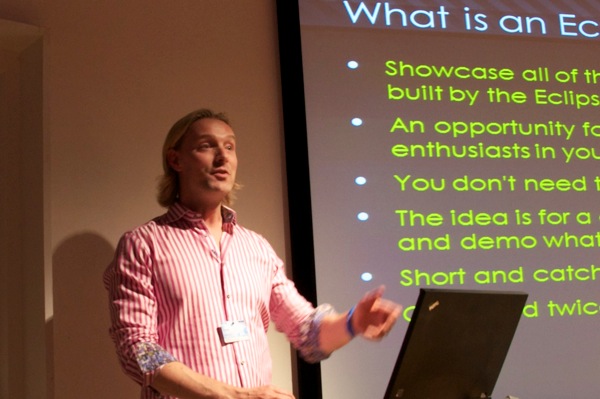
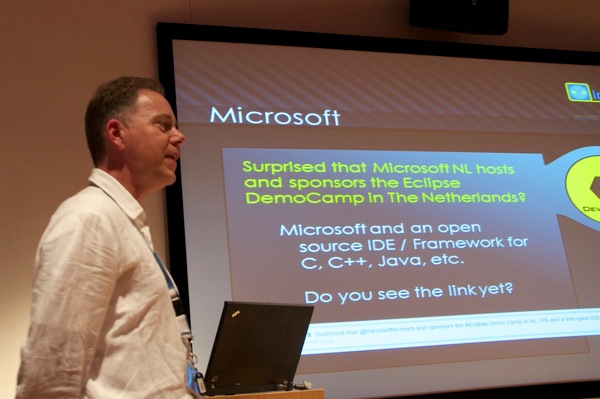
D7K 2905 Wim Hoek of Microsoft Nederland welcomes all visitors to this democamp and refers to various tweets about the meeting of these two camps. The reason is simple: Microsoft is about developers, developers, developers. And that includes developers using Eclipse.

D7K 2907 Yuri Kok of Industrial TSI welcomes and explains the program.

D7K 2910Wim Jongman, eclipse committer on ECF and with Industrial TSI, introduces Orion with some quiz questions, but he does not get to give away many prizes.

D7K 2913Next he talksed about how to run OSGi with plugins et all inside an web or application server, allowing Eclipse developers to leverage their RCP/plugin skills on the server.

D7K 2914About 30 people attended, I suspect mostly from the Dutch Eclipse world.
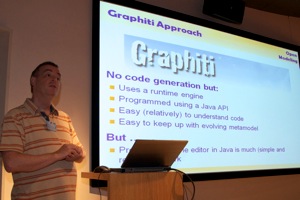
D7K 2917Jos Warmer presented a case about using modelling in the insurance industry with an RCP client with a graphical policy design editor, based on Graphiti and created with Spray, a DSL to generate Graphiti shapes. Note that Spray will become OSS at sometime in the future! Currently the link leads to an empty project.
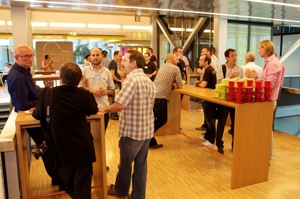
D7K 2919Next was a break with very nice hospitality in the very impressive Microsoft building, thank you Microsoft!

D7K 2923Roald Hopman explained the use of Talend Open Studio for data clean up and migration

D7K 2927It's obvious that Dutch meeting rooms are best suited to native Dutchmen, the tallest people in the world after the Masai. But that didn't prevent Martin Woodward to give a very fast and extensive presentation on Microsoft Team Foundation Server and demonstrating the Team Foundation Eclipse (TFE) plugin. TFE is truly a first class citizen on Team Foundation Server, running fast and well integrated on an Eclipse instance running on a MacBook pro.
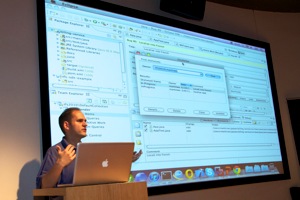
D7K 2929This may be a very good solution for developer shops running windows and other platforms (Mac/Linux/Mobile) and integrates access from Visual Studio and Eclipse into one ALM solution. I like the concept of gated commits: requiring successful CI tests before actual committing.

D7K 2934Other found it interesting as well as many people wanted more info afterwards instead of going out for the break.
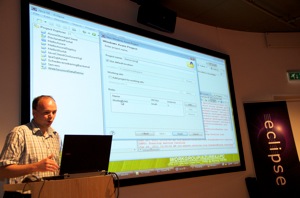
D7K 2939Teun Hakvoort talked about his experiences using the Windows Azure cloud platform for running a Java Enterprise container. Possible but not ready for prime time.

D7K 2943Finally Manuel Polling of Edmond Document Solutions talked about the use of an RCP based workbench for professional document workflow solutions and their switch to and experience developing a graphical workflow editor.

D7K 2944The evening concluded with lively discussions over drinks.

Thank you to Microsoft and Industrial TSI!